Google’s Email Verification Protocol (EVP): What It Verifies, What It Doesn’t, and What It Means for Your Signup Form

Since Chrome 150, Google has been testing a way for a website to confirm that a visitor owns the email address they just typed, without sending a confirmation email at all. The browser asks the mailbox provider directly, gets a signed token back, and hands it to the site. It is called the Email Verification Protocol, or EVP, and if it ships broadly it could change the signup form more than anything since the CAPTCHA. This article explains how it works, quotes what Google and the specification authors say it does and does not do, and sets out what a marketing or product team should change today, which is less than the headlines suggest.
A note on sources and on our position. Every factual claim below is taken from Google’s own developer posts, the Chromium announcement or the IETF draft, all read on 4 September 2026 and linked where they appear. We build ClearBounce, an email verification service, so we have an interest in how this lands. We have tried to state EVP’s strengths as plainly as its limits.
What the Email Verification Protocol is
The IETF draft, written by Dick Hardt of Hellō and Sam Goto of Google and published on 17 June 2026, defines it in one sentence: “the HTTP-level protocol by which a browser obtains a signed email verification token from an issuer and presents it to a relying party.” Translated: the issuer is the mailbox provider (today, Gmail), the relying party is your website, and the browser is the messenger in the middle.
The user experience, as described in Google’s launch post of 8 July 2026: the visitor enters their address in your form, Chrome checks with the provider in the background, and when the form is submitted your server receives a cryptographic token proving that the person is signed in to that mailbox on this device. No six-digit code, no “check your inbox” page, no link to click.
Why Google built it
Google’s public explainer is blunt about the status quo: email verification “is currently done insecurely and inefficiently.” It cites Google’s own survey of the 50 most-visited websites, in which 95% support email-based accounts and 73% block account creation until the address is verified. Every one of those flows depends on an email arriving quickly, not landing in spam, and the user switching apps to find it. The explainer also notes that a one-time code proves only that someone could read the inbox at that moment; it is not cryptographic proof of ownership.
The Chromium Intent to Experiment, posted by Sam Goto on 20 May 2026, frames the goal as helping users “create, access and recover accounts by providing cryptographic proof of ownership seamlessly rather than email OTPs manually.” The origin trial was scheduled for Chrome milestones 150 through 153, desktop first.
How it works, step by step
Google’s launch post walks through the flow. Condensed, it runs like this:
- The visitor fills in the email field. In the first release this had to happen through Chrome’s autofill; since the August 2026 update, typing or pasting an address also triggers verification once the user leaves the field.
- Chrome looks up a DNS record for the address’s domain that points to the issuer.
- The issuer confirms that the browser has an active, signed-in session for that exact address.
- The issuer returns an Email Verification Token (EVT), a signed JWT containing the address and the browser’s public key. It contains no information about which website asked.
- Chrome binds the token to your site and to a nonce your server generated, producing a key-bound token.
- The token is dropped into a hidden form field and submitted with the form.
- Your server checks the signatures, the nonce and the address, and treats the email as verified.
On the page, the entire integration is two form fields. This is the markup from Google’s post:
<input name="email-address" type="email" autocomplete="email">
<input type="hidden" name="token" nonce="rAnD0m-VaLuE"
  autocomplete="email-verification-token">
The design is deliberately declarative. The explainer says HTML attributes were chosen over a JavaScript API so the feature is “progressive”: a browser that does not understand the attribute simply ignores it, and your existing flow continues to work.
Where it stands today
| Date | Milestone | Source |
|---|---|---|
| 20 May 2026 | Intent to Experiment posted on blink-dev; origin trial planned for Chrome 150 to 153, desktop first | Chromium |
| 17 June 2026 | IETF Internet-Draft published as an individual submission (Hardt, Goto), intended status Standards Track | IETF |
| 30 June 2026 | Chrome 150 stable ships with the origin trial | Chrome release notes |
| 8 July 2026 | Google publishes the developer guide; Gmail is the only issuer | Chrome for Developers |
| August 2026 | Typed and pasted addresses now trigger verification; Chrome 152 adds a spinner and check mark in the field; Chrome 153 switches issuers to HTTP Message Signatures (a breaking change); Android “still under exploration” | Chrome for Developers |
Three facts in that table matter more than the rest. First, this is an origin trial: only sites that registered can use it, and Google can change or withdraw it. Second, the IETF document is an individual draft with no working group behind it yet; it expires on 19 December 2026 unless revised. Third, Gmail is the only issuer. A visitor with an Outlook, Yahoo, iCloud or company address gets nothing from EVP today.
What EVP actually verifies
It verifies one thing, and it verifies it well: at the moment of submission, the person in front
of the browser has an active session with the mailbox provider for that exact address. Because
the address comes from the provider’s own account, a typo is impossible; nobody is signed in
to gmial.com. Because the token is signed by the issuer and bound to your nonce, it
cannot be replayed on another site or forged. For account creation, login and recovery, that is
a real upgrade over a code pasted from an inbox.
What EVP does not verify
This is where the headlines about “the end of email verification” go wrong, and the people building the protocol are the first to say so.
Whether the address can receive mail
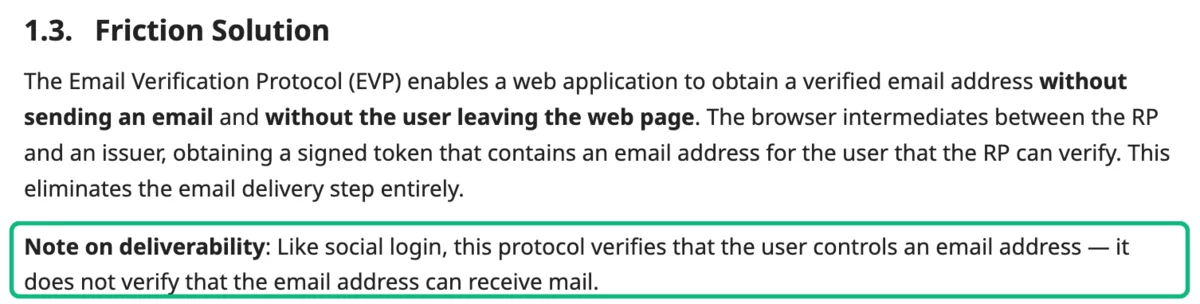
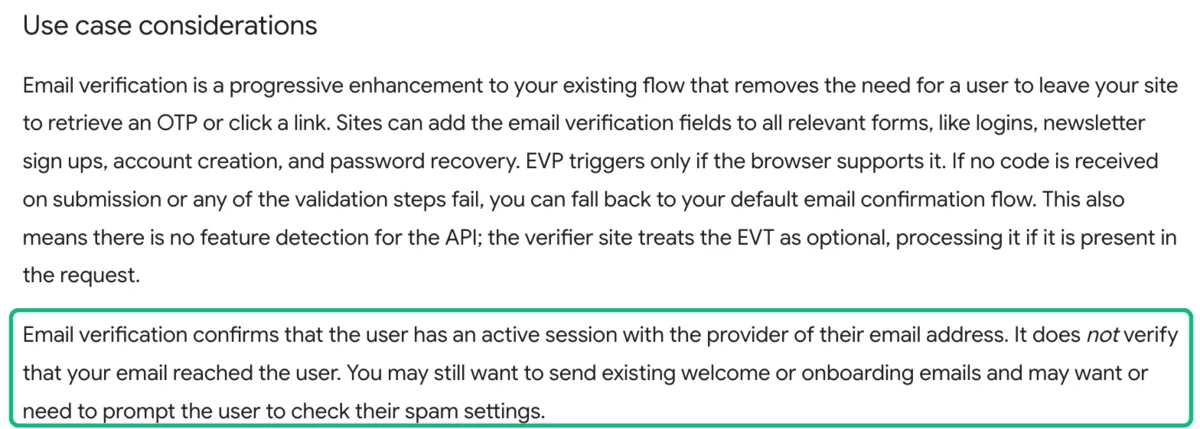
The IETF draft, section 1.3: “Like social login, this protocol verifies that the user controls an email address — it does not verify that the email address can receive mail.” Google’s developer post repeats it: “Email verification confirms that the user has an active session with the provider of their email address. It does not verify that your email reached the user.” Ownership at signup and deliverability at send time are different questions, and only the first one is answered.
Anyone not on Gmail
Gmail is the only participating provider. Google’s post is explicit about the fallback: “If no code is received on submission or any of the validation steps fail, you can fall back to your default email confirmation flow.” In practice that means your existing flow is not replaced; it is skipped for one segment of visitors. For consumer brands that segment can be large. For B2B forms, where most signups use a company domain, it is small.
Anyone not signed in, or not on Chrome desktop
The user must be signed in to the mailbox on the same browser profile. Shared devices, incognito windows, work laptops where personal Gmail is not logged in, and every non-Chromium browser fall back to the old flow. Android support was “still under exploration” as of August 2026.
What happens to the mailbox next month
A token proves the address was live and controlled on the day of signup. It says nothing about whether the mailbox is still open at your third campaign, whether it belongs to a person who reads it, or whether it is a role account. In the H1 2026 benchmark of 807,203 addresses that ClearBounce users uploaded from their own lists, 10.2% were invalid and a further 8.7% were risky. Most of those were once perfectly real addresses. Ownership at signup does not stop list decay, and abandoned addresses are exactly the ones that get recycled into spam traps; only periodic re-verification catches that. The real cost of a dirty list is paid at send time, not at signup.
Consent
Proof of address control is not proof of consent to receive marketing. Under the GDPR the controller must be able to demonstrate that the person consented (Article 7(1)), and a confirmation email is the evidence many teams keep for that. An EVP token, logged with the signup, is strong evidence that a real account holder submitted the form, but the consent language, the checkbox state and the timestamp are still yours to record.
Whether someone is probing your form
The draft’s security section (11.3) flags a risk that cuts the other way: because “any software—not just browsers—can send requests to an issuer’s issuance endpoint,” an attacker could try to use issuers to discover which addresses have accounts. The draft asks issuers for uniform error responses and rate limiting. For site owners the takeaway is that EVP is not a bot defence; it tells you a Gmail account exists and is signed in, which a fraud farm with a thousand Gmail accounts can also arrange.
What changes for double opt-in
The obvious question is whether EVP retires the confirmation email. Our view, and the reason we wrote a whole guide on double versus single opt-in, is that a confirmation email has always done three jobs at once:
- Prove the address is real and owned. EVP does this better, for Gmail users on Chrome.
- Prove the address can receive your mail. The confirmation message is your first delivery test; a hard bounce there tells you something no token can. EVP does not do this at all.
- Record an explicit act of consent. Clicking a link in a message that says “confirm you want our newsletter” is unambiguous. EVP records a form submission.
So the honest answer is: EVP can replace the first job, for part of your audience, once it leaves the trial. It cannot replace the other two. Teams that run double opt-in mainly to stop fake and mistyped addresses gain the most, because that is exactly the friction EVP removes. Teams that run it for deliverability signal or consent evidence should keep it, or replace the delivery test with a verification check that actually talks to the mail server, which is what email verification does.
What changes for signup form protection
Here EVP is unambiguously good news. Typos vanish for Gmail users, and a signed token is a stronger signal than any client-side check. But look at what a signup form actually receives. As we set out in how to stop fake emails at signup, the addresses that cause trouble are disposable domains, catch-all domains, role accounts and dead mailboxes, and they arrive on every kind of provider, not just Gmail. EVP touches none of those categories.
The practical design for 2026, then, is layered. Let Chrome verify Gmail users instantly where it can. For everyone else, and for the questions EVP cannot answer, run a real-time check at the form: syntax, disposable domain, MX record, mailbox existence, catch-all detection and role account detection. That is what a form widget such as ClearBounce Shield or a call to the verification API (the developer notes show the request shape) does today, in the same fraction of a second, for any domain and any browser. If you want to see what such a check returns for a single address, the free email checker runs the same pipeline.
What to do now
- Do not remove your confirmation flow yet. EVP is a Chrome desktop trial with one issuer. Your fallback is your main path for most visitors.
- If you run a Gmail-heavy consumer signup, join the trial. The integration is two form fields plus server-side token validation; Google’s post links the registration. Measure how many verifications succeed and how much confirmation drop-off you recover.
- Log the token. If you take part, store the verified token alongside the consent record. It is better evidence than an IP address.
- Keep real-time verification at the form for non-Gmail addresses and for the disposable, catch-all and role checks EVP does not perform.
- Keep cleaning the list. Ownership at signup does nothing for addresses that die later. Re-verify before large sends; the steps are in how to clean your email list, and the reason is your sender reputation.
- Watch two things: whether a second mailbox provider becomes an issuer, and whether the IETF draft is adopted by a working group. Either would move EVP from experiment to infrastructure.
Frequently asked questions
What is Google’s Email Verification Protocol?
A protocol, currently in a Chrome origin trial, that lets a website confirm a visitor owns an email address without sending a confirmation email. The browser obtains a signed token from the mailbox provider proving the user is signed in to that address, and passes it to the site in a hidden form field.
Which email providers support EVP?
As of Google’s July and August 2026 posts, Gmail is the only issuer. Visitors with any other address fall back to the site’s normal confirmation flow.
Does EVP verify that an email address can receive mail?
No. The IETF draft states that the protocol verifies the user controls the address and does not verify that it can receive mail, and Google’s developer post says it does not verify that your email reached the user.
Does EVP replace double opt-in?
It can replace the ownership check that double opt-in provides, for Gmail users on Chrome desktop, once it leaves the trial. It does not replace the deliverability signal or the explicit consent record that a confirmation email provides.
Does EVP replace email verification services?
No. EVP answers one question at signup for one provider. Verification services check deliverability, disposable and catch-all domains and role accounts for any address, and re-check lists over time. The two are complementary.
When will EVP be available to everyone?
There is no announced date. The origin trial covers Chrome 150 to 153, is desktop only, and the specification is an individual IETF draft that expires in December 2026 unless revised.