How Email Verification Works: A Simple Guide to the Process

You have an email list. Maybe it's a hundred subscribers from your signup form, maybe it's a hundred thousand contacts from years of marketing. Either way, you have no idea how many of those addresses are actually valid. Some people mistyped their address. Some changed jobs and their old inbox was deleted. Some used a throwaway address they'll never check again.
If you send to all of them anyway, you're inviting bounces, spam complaints, and reputation damage that can cripple your email program. That's where email verification comes in -- the process of checking whether an email address is real, active, and safe to send to, without actually sending an email.
In this guide, we'll walk through exactly how email verification works at a high level, what each step catches, what the results mean, and how to use verification to protect your sender reputation and improve your deliverability.
Why Verify Emails in the First Place?
Before we get into the how, let's talk about the why. If you're collecting email addresses -- through forms, purchases, lead magnets, or any other channel -- a surprising percentage of them will be invalid from the start or will become invalid over time.
Industry research consistently shows that email lists decay at about 2-3% per month. People change jobs (and lose their work email), abandon old accounts, switch providers, or simply close their inbox. On top of natural decay, a significant portion of addresses are entered incorrectly at the point of collection -- typos, fake addresses, or bots filling out your forms.
When you send to these bad addresses, several things happen -- none of them good:
- Hard bounces spike. The receiving mail server rejects your email because the address doesn't exist. Mailbox providers like Gmail and Outlook track your bounce rate closely. Exceed 2% and you're flagged as a careless sender.
- Your sender reputation drops. Bounces, complaints, and spam trap hits all feed into the reputation score that determines whether your emails reach the inbox or the spam folder. A damaged reputation affects every email you send, not just the ones to bad addresses.
- You waste money. Most email service providers charge based on list size or sends. Every email sent to an invalid address is money spent with zero chance of return.
- You risk blacklisting. Sending to spam traps -- old, abandoned addresses that have been repurposed to catch bad senders -- can land your domain or IP on a blocklist, causing widespread delivery failures.
Email verification prevents all of this by checking each address before you send.
2-3%
of email addresses become invalid every month due to natural list decay
<2%
maximum hard bounce rate before mailbox providers start throttling your sends
97%+
deliverability rate achievable with regular list verification
The 4 Steps of Email Verification
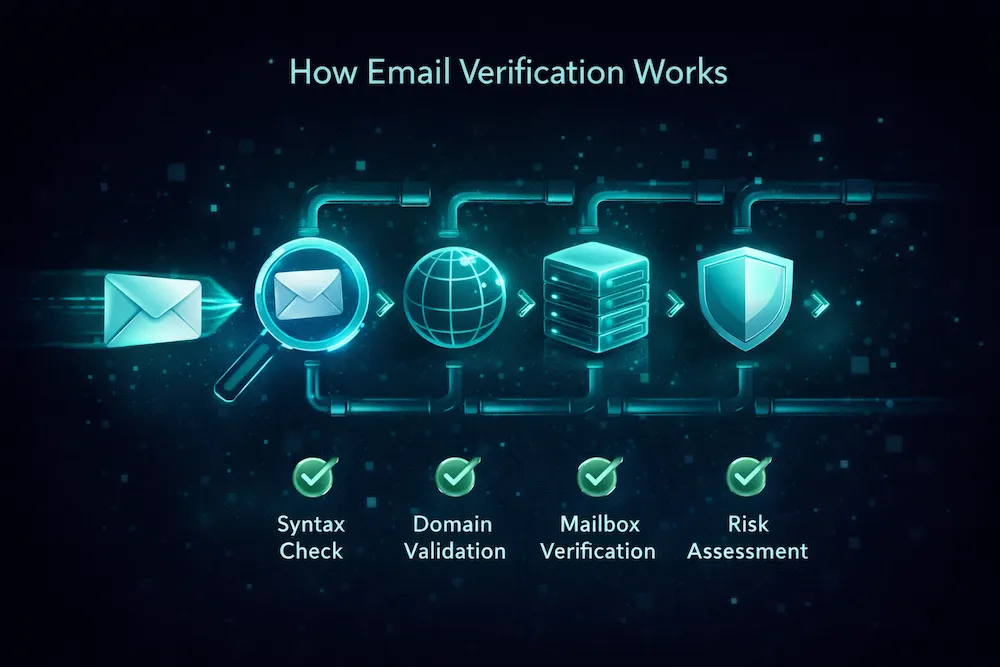
When you submit an email address for verification -- whether through a bulk list upload or a real-time API call -- the verification service runs it through a multi-step process. Each step adds a layer of confidence to the final result.
Syntax Validation
The first step is the simplest: does this email address follow the basic rules of email formatting? An email address must have a local part (the bit before the @), an @ symbol, and a domain part (the bit after the @). The syntax check validates that the structure is correct and that no illegal characters are present.
What it catches: Obvious typos like missing @ symbols, double dots, spaces in the address, missing domain extensions, and addresses with invalid characters. For example, john@.com or jane@@company.com would fail at this stage. This step also catches common domain typos like user@gmial.com or user@yaho.com.
Domain and DNS Verification
Once the syntax is confirmed valid, the next step checks whether the domain actually exists and is configured to receive email. This involves looking up the domain's DNS records -- specifically its MX (Mail Exchange) records, which tell the internet which servers handle email for that domain.
What it catches: Addresses on domains that don't exist, domains that have expired, domains with no mail server configured (meaning they can't receive email at all), and parked or placeholder domains. For instance, if someone enters contact@totallyinventeddomain.com and that domain doesn't have MX records, the address is flagged as undeliverable without needing any further checks.
Mailbox Verification
This is the core of the verification process. The service connects to the domain's mail server and checks whether the specific mailbox (the local part of the address) actually exists. It does this by initiating a conversation with the mail server -- essentially asking "would you accept a message for this address?" -- without ever sending an actual email.
The mail server's response reveals whether the mailbox is active, whether it doesn't exist, or whether it's full and unable to accept new messages. This is the step that catches the bulk of invalid addresses -- the ones where the domain is real but the specific user account has been deleted, never existed, or is no longer active.
What it catches: Deleted employee accounts at companies, abandoned personal inboxes, mistyped usernames (like jonh@company.com instead of john@company.com), and mailboxes that have been deactivated by the provider.
Risk Assessment
Even if an address passes the first three checks, it might still be risky to send to. The final step evaluates the address against a range of risk factors that could indicate trouble -- even though the address is technically valid.
What it catches: Disposable/temporary addresses from services like Guerrilla Mail or Temp-Mail (people use these to grab a freebie and never check them again). Role-based addresses like info@, support@, or sales@ (these go to shared inboxes and generate higher complaint rates). Catch-all domains that accept mail for any address, making it impossible to confirm a specific mailbox exists. Known complainers and addresses associated with spam traps. For more on handling catch-all emails, see our dedicated guide.
Understanding Verification Results
After running through all four steps, every email address receives a result code. Most verification services categorize results into four buckets:
| Result | What It Means | What to Do |
|---|---|---|
| Deliverable | The address is valid, the mailbox exists, and the server confirmed it can accept mail. | Safe to send |
| Undeliverable | The address is invalid -- syntax error, domain doesn't exist, or the mailbox has been deleted. | Remove immediately |
| Risky | The address exists but carries risk factors: catch-all domain, disposable address, role-based, or low reputation. | Send with caution or suppress |
| Unknown | The mail server didn't provide a definitive answer -- it may be temporarily unavailable or blocking verification requests. | Retry later or send cautiously |
The most important action is removing undeliverable addresses. These are guaranteed bounces. Keeping them on your list is like voluntarily damaging your sender reputation.
The risky category requires more judgment. Catch-all addresses, for example, might be perfectly valid -- or they might not. Some marketers send to catch-all addresses from reputable companies but suppress disposable and role-based ones. Your risk tolerance and sending reputation should guide this decision. We've written a deeper guide on what to do with catch-all emails if you want to dig into that topic.
Bulk Verification vs. Real-Time API
There are two main ways to use email verification, and most serious senders use both:
Bulk List Verification
You upload an entire list -- a CSV or TXT file with thousands or millions of email addresses -- and the verification service processes them all at once. Results are typically returned as a downloadable file with each address tagged by its result.
Best for: Cleaning existing lists before campaigns, processing purchased or acquired lists, periodic hygiene on your entire database, and pre-send verification on large blasts. Depending on the provider and list size, results can take anywhere from minutes to a few hours.
Real-Time API Verification
Instead of verifying after the fact, you integrate an email verification API into your signup forms, checkout flows, or CRM. When someone enters their email, the API verifies it in real time -- typically in under a second -- and either accepts or rejects the entry before it ever reaches your list.
Best for: Preventing bad data from entering your system in the first place, protecting sign-up flows from bots and typos, validating entries at point of sale, and keeping CRM data clean at the source.
| Bulk Verification | Real-Time API | |
|---|---|---|
| Use case | Cleaning existing lists | Validating new entries as they happen |
| Speed | Minutes to hours (depends on list size) | Under 1 second per address |
| Integration | Upload via dashboard, no code needed | API integration into forms/apps |
| When to use | Before campaigns, quarterly hygiene | Always-on, at point of collection |
| Ideal pairing | Use together -- bulk cleans your backlog, API prevents new problems |
The strongest approach is combining both: use bulk verification to clean your existing list, and implement real-time API verification to keep it clean going forward.
What Email Verification Cannot Do
Verification is powerful, but it's not magic. It's important to understand its limitations so you don't rely on it for things it wasn't designed to do:
- It can't guarantee inbox placement. Verification confirms the address is valid, not that your email will land in the inbox. Inbox placement depends on your sender reputation, content quality, authentication, and many other factors.
- It can't tell you if someone wants your email. A valid address doesn't mean a willing recipient. Verification doesn't replace consent-based list building. If someone didn't opt in, sending to them -- even at a verified address -- can generate spam complaints.
- It can't catch every spam trap. Some spam traps are recently deactivated addresses that still accept mail. They look like valid, deliverable addresses to any verification check. Only consistent list hygiene and engagement-based suppression can minimize trap exposure.
- It can't prevent all bounces. An address might be valid at the moment of verification and become invalid hours later (someone gets fired, closes their account). Verification is a snapshot in time, which is why regular re-verification matters.
- It doesn't replace good sending practices. Verification is one layer of protection. You still need proper authentication (SPF, DKIM, DMARC), consistent sending volume, compelling content, and easy unsubscribe options to maintain strong deliverability.
Think of email verification as a seatbelt, not autopilot. It dramatically reduces your risk, but you still need to drive responsibly.
How Often Should You Verify Your List?
The short answer: more often than you think. The long answer depends on how you collect and use your email data:
If you're about to send to your full list or a large segment, verify it first. The cost of verification is a fraction of the cost of reputation damage from bounces.
If you send regularly (weekly or biweekly), verify your full list at least once a month. This catches addresses that have gone bad since your last clean.
Even lists you don't send to regularly are decaying. If you plan to re-engage a dormant segment, verify it before you send.
Catch typos and fake addresses at the point of entry with API verification on your forms. This is the single best way to prevent bad data from entering your system.
A good rule of thumb: if your list hasn't been verified in the last 30 days, verify it before your next send. The longer you wait, the more dead addresses accumulate -- and the higher your bounce rate will be when you finally do send.
How to Choose an Email Verification Provider
Not all verification services are created equal. Here's what to look for when choosing a provider:
- Accuracy. This is the most important factor. A good provider should deliver 98%+ accuracy -- meaning when they say an address is deliverable, it actually is. Low accuracy means you're either still sending to bad addresses (false positives) or throwing away good ones (false negatives). Look for providers that publish their accuracy rates and compare results.
- Speed. For bulk verification, a provider should process large lists efficiently -- tens of thousands of addresses per minute. For API verification, response time should be under a second. Slow verification slows down your entire workflow.
- Coverage of result types. Beyond just valid/invalid, a good provider detects catch-all domains, disposable addresses, role-based emails, and known complainers. The more granular the results, the better decisions you can make about what to keep and what to suppress.
- Data security. You're uploading email addresses, which is sensitive data. Ensure the provider has clear data handling policies, doesn't sell or share your data, and deletes uploaded lists after processing.
- Pricing transparency. Avoid providers with complicated pricing tiers or hidden fees. Look for straightforward per-verification pricing that scales with your usage. Most reputable services offer a free tier or free credits so you can test before committing.
- Both bulk and API. You'll likely need both methods over time. Choose a provider that offers both so you don't have to manage multiple vendors.
The Bottom Line
Email verification is not a luxury -- it's a fundamental part of responsible email sending. Every address on your list that can't receive mail is actively working against you: triggering bounces, eroding your reputation, wasting your budget, and dragging down the deliverability of emails sent to your real, engaged subscribers.
The process itself is straightforward. Four steps -- syntax validation, domain/DNS check, mailbox verification, and risk assessment -- give you a clear picture of which addresses are safe, which are dangerous, and which need a closer look. Whether you verify in bulk before a campaign or in real time at the point of collection, the result is the same: a cleaner list, fewer bounces, and better deliverability.
The senders who consistently reach the inbox aren't just writing better emails. They're sending to better lists. Verification is how you get there.
Try it yourself -- 100 free verifications.
Upload a list or test our API. See exactly how ClearBounce categorizes your addresses into deliverable, undeliverable, risky, and unknown -- so you can send with confidence.
No credit card required. Results in minutes.
Start Verifying Free