Clearbit Alternatives in 2026: What to Use Now That Clearbit Connect Is Gone


If you are here because your Clearbit Connect sidebar stopped returning results, or because a script that called the Clearbit API started failing, the short version is this: HubSpot bought Clearbit, the free tools were switched off on 30 April 2025, and what remains lives inside HubSpot as Breeze Intelligence. There is no single replacement, because Clearbit was never a single product.
Full transparency: we build ClearBounce, and our Email Finder replaces one of the four things Clearbit did. It does not replace the other three, and this post says so plainly. Every date and policy below is quoted from Clearbit’s or HubSpot’s own pages, linked where it appears, and was read on 27 August 2026.
What actually happened to Clearbit
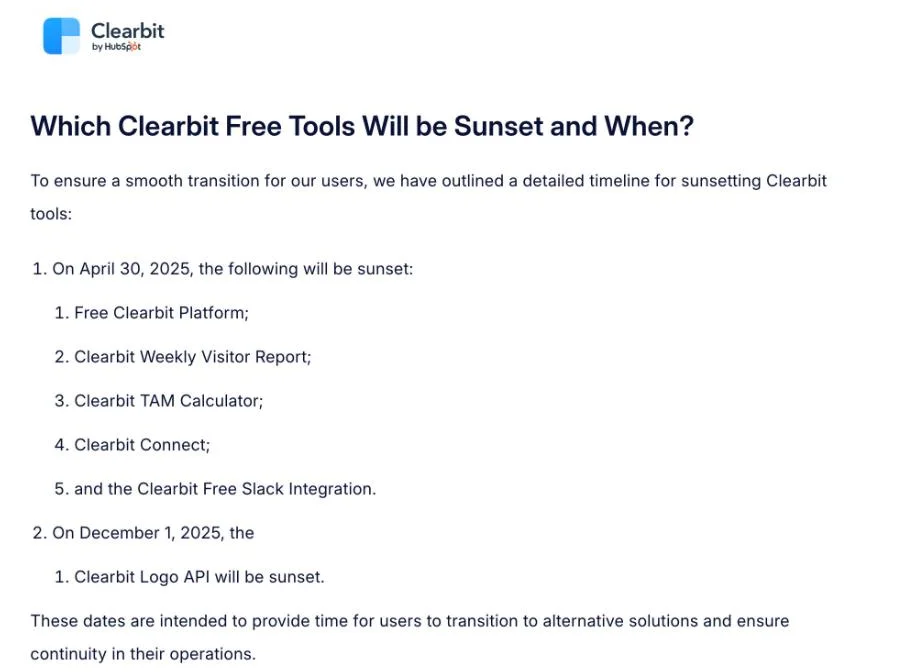
On 4 December 2023 HubSpot announced that it had finalised its acquisition of Clearbit. For a while not much changed. Then Clearbit published The Future of Clearbit’s Free Tools, which set out the retirement schedule in its own words: “As part of this transition, some legacy free Clearbit tools will be sunsetted, paving the way for more advanced and integrated solutions.”
Two dates matter, and both have now passed:
- 30 April 2025 — the free Clearbit platform, the Weekly Visitor Report, the TAM Calculator, the free Slack integration and Clearbit Connect were retired.
- 1 December 2025 — the Logo API was retired.
The clearbit.com home page now reads “Clearbit has joined HubSpot.” That is the whole story in four words, and it explains why so many people arrive at a search engine looking for a Gmail extension that no longer exists.

What Clearbit Connect actually did
Connect was a Gmail and Chrome extension. You opened a compose window, typed a company domain and a person’s name, and it returned a business email address from Clearbit’s dataset without you leaving the inbox. It had a free tier, it lived where the work already happened, and that combination is why it was the piece people miss most.
It is worth being precise about what it was, because that determines what can replace it. Connect was a lookup tool: it told you an address existed in a database. It was not a verifier, and it did not promise that the address would still accept mail today. That distinction becomes the whole point later in this post.
Breeze Intelligence is the successor, but not a drop-in replacement
Clearbit points users at Breeze Intelligence, and for a team already running HubSpot that is genuinely the lowest-friction path: enrichment lands directly on the contact and company records you already work in, with nothing to sync. If that describes you, start there rather than shopping around.
For everyone else, two lines from HubSpot’s own credits documentation decide the question. The first is about access: “only users with paid seats (Core Seats, Sales Seats, Service Seats, and Revenue Seats) and Partner Seats can use HubSpot Credits. Free users and View-only Seat users cannot use HubSpot Credits.” The second is about what happens to what you do not spend: “unused credits expire at the end of each usage period and do not roll over.”

Read together, that is a different shape of product from the one people are trying to replace. Connect was a free extension anyone could install. Its successor requires a paid HubSpot seat, and capacity you do not use in a given month is gone rather than banked. If you are on Salesforce, Pipedrive or no CRM at all, this is not a migration — it is a different purchase. Our own credits never expire, which is a deliberate choice in the other direction, and one you should weigh against everything else rather than on its own.
Work out which Clearbit you are replacing
Most “Clearbit alternatives” lists fail here. They compare whole companies when what you actually lost is one job. Find your row first:
| The job | What Clearbit called it | Where to look now |
|---|---|---|
| Find a person’s business email | Clearbit Connect | Email finder tools |
| Confirm an address still accepts mail | — (Clearbit did not do this) | Email verification |
| Enrich a company from its domain | Enrichment API | Breeze Intelligence or a data provider |
| Identify anonymous site visitors | Reveal | Breeze Intelligence or a visitor-ID tool |
| Fetch a company logo by domain | Logo API | Logo.dev |
Notice the second row. It was never a Clearbit feature, and it is the gap that quietly causes the most damage after a migration.
Replacing Connect: finding a business email address
Three options cover most of this need, and they work in noticeably different ways.
Hunter is the closest like-for-like. Its pricing page lists a free plan with 50 credits per month and a free Chrome extension, which is roughly the shape Connect had.
Apollo comes at it from the prospecting-database end and also ships a Chrome extension for pulling contact details while you browse. It is a heavier tool than Connect was; whether that is an upgrade depends on whether you wanted a database or a lookup box.
Our Email Finder takes the pattern route. Companies rarely assign
addresses at random — they settle on one format such as
first.last or f.last — so the finder works that format out
from addresses the company has already made public and applies it to your contact’s
name. Searching is free; verifying a candidate costs one credit. There is a longer
walkthrough in how to find someone’s
business email address.
We also ship a free Chrome extension, but it is worth saying what it is and is not: it verifies addresses and scans a page for the ones already on it, rather than looking a person up from your inbox the way Connect did. If the browser-native habit is what you miss, that is the closest we get — the lookup itself happens in Email Finder.
All three return candidates. None of them can tell you, from a database alone, whether the mailbox behind a candidate is still open.
The part no finder can do: proving the address is real
This is where teams migrating off Clearbit get hurt. A found address feels like a fact. It is an inference — either from a dataset assembled at some point in the past, or from a naming pattern applied to a name.
For scale on how far “plausible” sits from “deliverable”: across 807,203 addresses in our first-half 2026 benchmark, 75.9% came back deliverable. The rest were split between invalid addresses, risky ones, and mailboxes sitting behind catch-all servers. Those are lists our customers built themselves — signups, imports, CRM exports — not addresses guessed by a tool. Roughly a quarter of a list people assembled by hand was not clean. An address a finder inferred this morning has had no such check at all.
The fix is a step, not a product decision: run found addresses through
verification before the first send. Verification checks
the domain, the mail exchanger and the mailbox itself, which is a different operation from
a database lookup —
how email verification works covers the
mechanics. It also catches the categories a finder will happily hand you:
role-based addresses like
info@ and sales@, and
disposable domains. If you would rather see
it work before signing up, the
free syntax validator and the
disposable checker are open to anyone.
Replacing company enrichment
The Enrichment API turned a domain into firmographics: size, industry, location, funding. Inside HubSpot, Breeze Intelligence is the direct continuation of that. Outside HubSpot, there is a real standalone market for it, but we do not operate in that category and have not run the vendors through our own testing, so we are not going to rank them for you here. What we would check before committing: whether the pricing model is per-record or subscription, whether unused capacity carries over, and how recently the records you care about were refreshed.
One thing worth planning for regardless of vendor: enrichment data ages, and it ages unevenly. Job titles and headcount drift within months, and an address attached to a departed employee stays syntactically perfect while quietly becoming a bounce.
Replacing Reveal, the visitor identification piece
Reveal matched anonymous site traffic to companies by IP. Breeze Intelligence carries this forward for HubSpot customers, and a separate market of visitor-identification tools exists outside it. We do not build one.
If you are replacing this piece and you have European traffic, treat it as a compliance question and not only a tooling one. Identifying a company is a different thing from identifying a person, and vendors vary in which one they actually do.
Replacing the Logo API
This one Clearbit answered itself. The same post that announced the 1 December 2025
retirement says: “If you’re looking for a logo service, you can explore
alternatives like Logo.dev.” If you have hard-coded
logo.clearbit.com URLs anywhere, they are the cheapest thing on this page to
fix and the easiest to forget.
What none of this replaces
A finder tells you an address probably exists. A verifier tells you it accepts mail. Neither gives you a reason to be in someone’s inbox, and neither creates a lawful basis for contacting them — that is the same limit we set out in should you buy an email list, and it applies just as much to addresses you found yourself.
The other thing no tool replaces is sending discipline. If your domain carries an unclean list into a new sending platform, a better data source will not save the reputation. Verification protects the send; it does not license it.
A migration order that avoids surprises
- Export while you still can. Anything still reachable in an old Clearbit or HubSpot view should be on your own disk before you change anything.
- Split the jobs apart. Use the table above. Teams routinely buy an enrichment platform to solve what was actually a lookup problem.
- Re-verify everything Clearbit ever found. Those addresses have been sitting unverified since at least April 2025. This is the step that protects your bounce rate on the first send from the new stack.
- Swap the API calls, do not rebuild. If a workflow called Clearbit for enrichment and then sent, the send half usually survives. Our verification API and the Zapier and Make integrations are designed to drop into an existing step.
- Read the expiry terms before you buy. Monthly credits that do not roll over price very differently from credits that sit until you need them, and the headline number rarely shows it. Our pricing guide works through the arithmetic.
If email lookup and verification is the part you are replacing, you can try it with 100 free credits — no card required — and searching in Email Finder does not consume them at all.
Frequently asked questions
Is Clearbit gone completely?
Not completely, but it is no longer a standalone product you can casually sign up for. The company was acquired by HubSpot in December 2023, the free tools were retired on 30 April 2025, and clearbit.com now states that Clearbit has joined HubSpot. The capability continues inside HubSpot as Breeze Intelligence.
Is there a free replacement for Clearbit Connect?
There are free tiers, though none is a like-for-like copy. Hunter’s pricing page lists a free plan with 50 credits per month plus a free Chrome extension. Searching in our Email Finder is free and only verifying a result costs a credit, and new accounts get 100 credits without a card. Our own free Chrome extension verifies and scans pages rather than looking contacts up from the inbox.
Do I need a HubSpot subscription to use Breeze Intelligence?
You need a paid seat. HubSpot’s own documentation states that only users with paid seats and Partner Seats can use HubSpot Credits, and that free and View-only Seat users cannot. It also states that unused credits expire at the end of each usage period and do not roll over.
Are the addresses an email finder returns safe to send to?
Not until they are verified. A finder returns candidates inferred from a dataset or a naming pattern, which is a different claim from the mailbox being open today. Across 807,203 addresses in our first-half 2026 benchmark — lists customers built themselves, not guessed — 75.9% were deliverable, so even carefully assembled lists carry roughly a quarter that needs attention. Verify before the first send.