
 Works with Campaign Monitor
Verify your Campaign Monitor lists and mark every subscriber
Connect Campaign Monitor with your API key, pick a list, and ClearBounce checks every active subscriber. One click writes the result back to each subscriber as a custom field, so your next campaign can skip the addresses that would bounce.
100 free credits. No credit card required.
Integrations › Campaign Monitor
Connected
7 subscribers have never been checked.
| Subscriber | Result | ClearBounce Status in CM |
|---|
Simulated. Nothing is sent, and no credits are used.
Connect with one API key
There’s nothing to install. ClearBounce reads your lists and updates subscribers through the Campaign Monitor API, using a key you can revoke at any time.
- 1Copy the key. In Campaign Monitor, click your profile image, then Account settings › API & integrations, and copy the API key.
- 2Paste it. In ClearBounce, open Integrations › Campaign Monitor and paste the key.
- 3Connect. Your lists appear with their active subscriber counts.
Managing several clients? An account API key shows the lists of every client, each labeled with the client’s name.
Account settingsAPI Key
This API allows other applications and tools to access this email account.
Connect your Campaign Monitor accountVerify a list, then write the results back
Each list shows when it was last verified. A run checks every active subscriber, and once it’s done one button writes the results to the subscribers in Campaign Monitor. Running the list again after an import only checks the new subscribers.
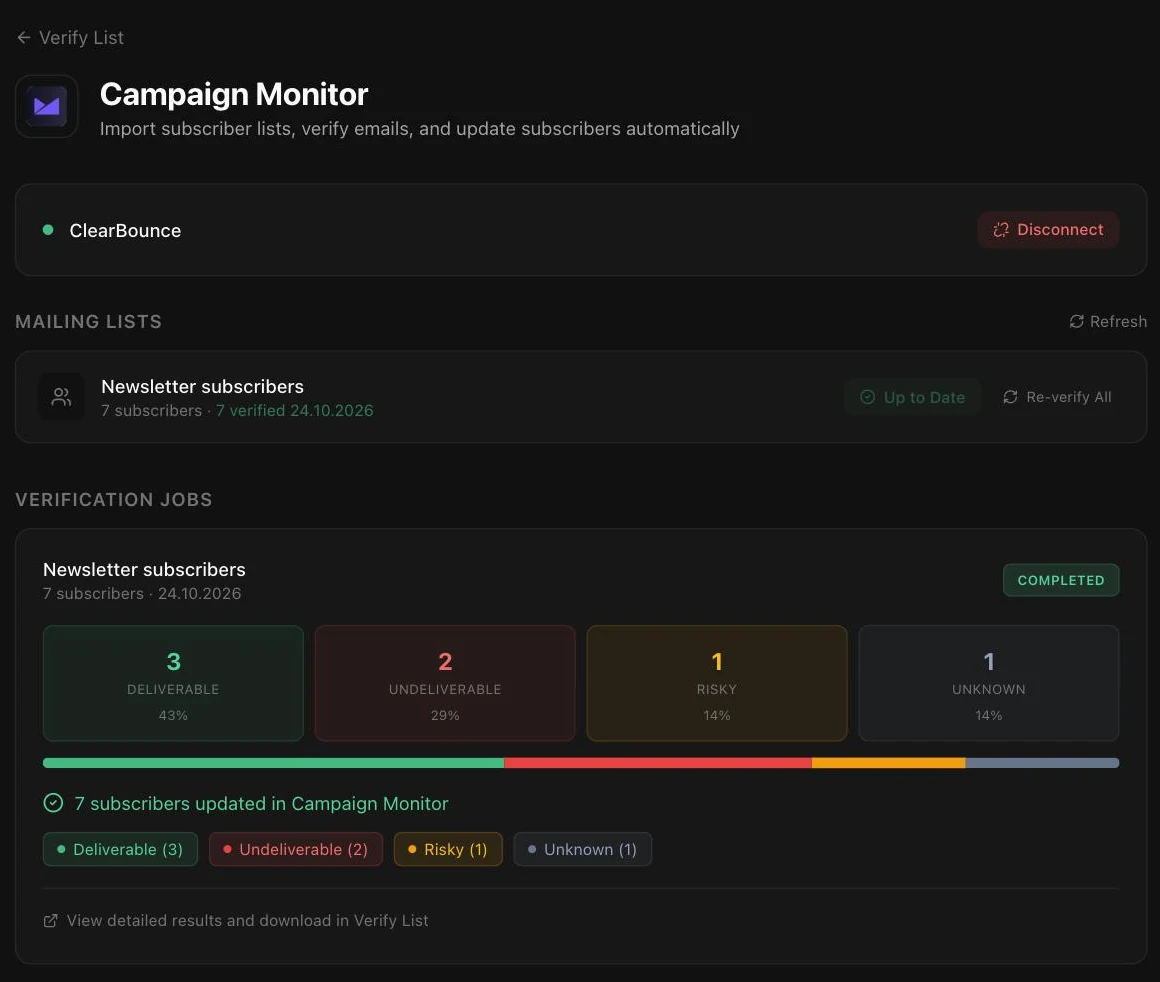
Two custom fields on every subscriber
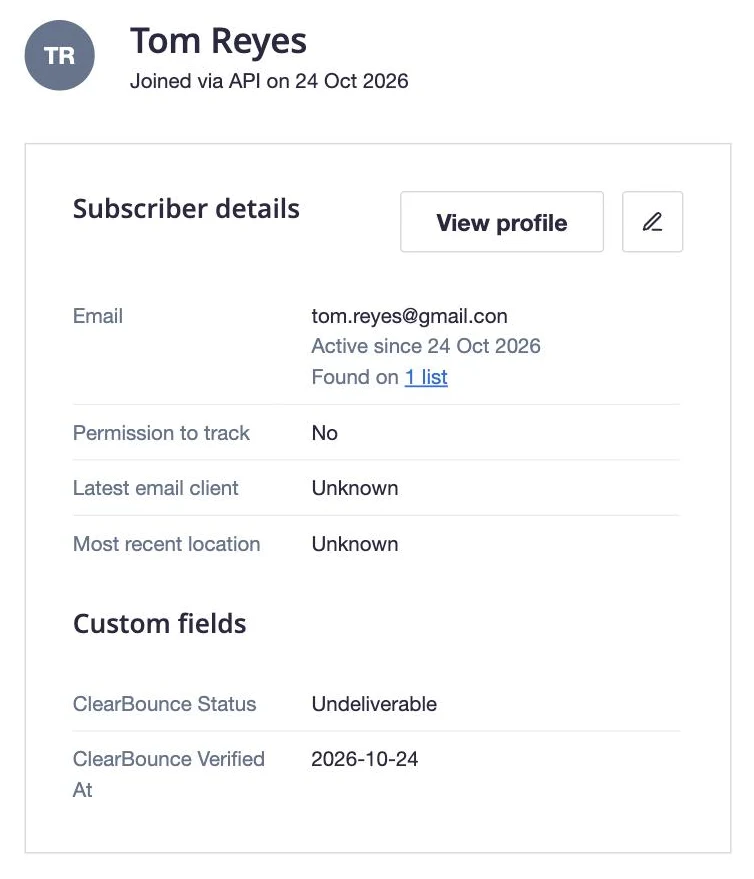
The first time you write results to a list, ClearBounce creates two text fields on it. They’re hidden from the subscriber preference center, so your subscribers never see them.
- ClearBounce Status
- Deliverable, Undeliverable, Risky or Unknown.
- ClearBounce Verified At
- The date of the check, so you can re-verify old results on your own schedule.
Nothing else changes. ClearBounce never deletes, unsubscribes or resubscribes anyone, and subscriber names and other fields stay as they are.
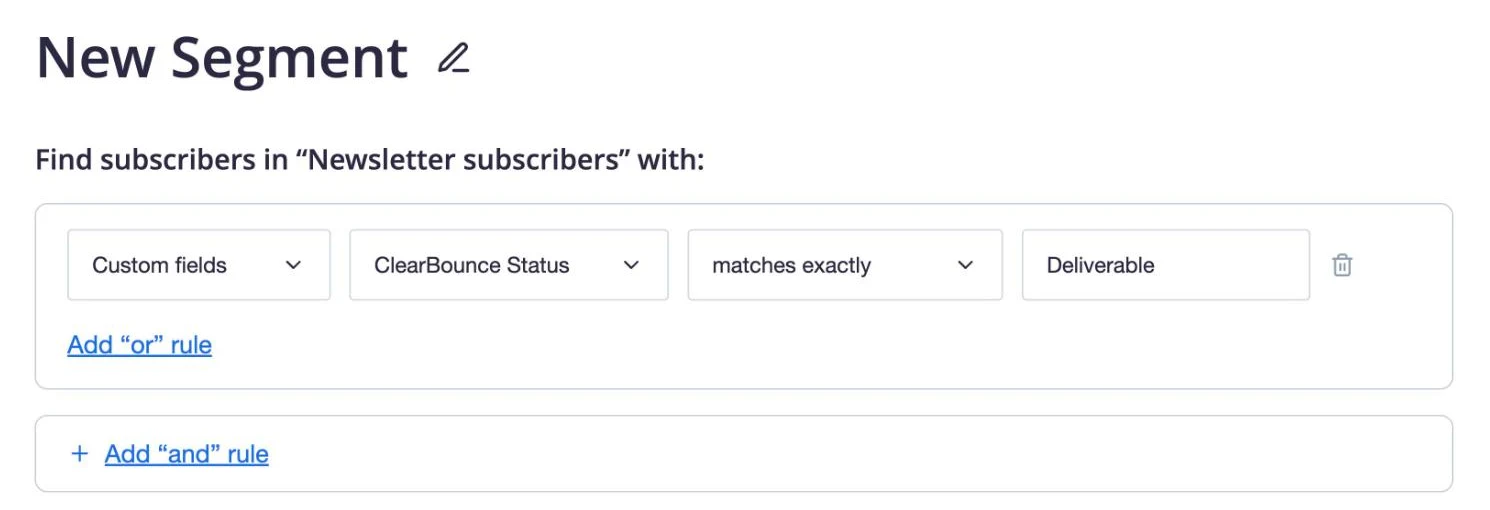
Send only to the subscribers who’ll get it
Create a segment on the list, choose Custom fields › ClearBounce Status › matches exactly and enter Deliverable, then send your campaign to that segment. To keep everyone except the addresses that would bounce, use does not match exactly with Undeliverable instead.
Because the fields stay on the subscribers, the same segment keeps working for every campaign. Re-verify the list after big imports, and the new subscribers get their own result.
What to do with each result
Every subscriber comes back with one of four results. Deliverable is safe to send. For the other three, here’s what we’d do with a marketing list.
Not sure where to start? Send to everyone except Undeliverable, and compare your bounce rate with the last campaign.
Made for agencies running many clients
Campaign Monitor is built for agencies that send on behalf of their clients. The ClearBounce connection follows the same model, so one key covers the whole account.
-
Every client in one place
Connect with your account API key and the lists of every client appear together, each labeled with the client’s name.
-
Clients’ lists stay theirs
Results go into two hidden fields. Nobody is removed or unsubscribed, so each client decides what happens to their own subscribers.
-
Pay only for new subscribers
Re-running a list skips subscribers that were already verified, so regular clean-ups only cost what was added since the last run.
Set it up in four steps
-
Create a ClearBounce account
Sign up free. Your account starts with 100 credits.
-
Connect Campaign Monitor
Copy your API key from Account settings › API & integrations in Campaign Monitor, then paste it on Integrations › Campaign Monitor in ClearBounce.
-
Verify a list
Click Verify list next to the list. ClearBounce imports its active subscribers and checks each one. Progress and results show on the same page.
-
Write the results back
Click Update subscribers in Campaign Monitor. Then create a segment where ClearBounce Status matches exactly Deliverable, and send to it.
Questions
Where do I find my Campaign Monitor API key?
In Campaign Monitor, click your profile image at the top right, then open Account settings and choose API & integrations. Copy the API key and paste it into ClearBounce. Don’t generate a new key unless you mean to, because that replaces the old one.
Which subscribers are checked?
The active subscribers of the list you pick. Unsubscribed, bounced and deleted subscribers are left out, and subscribers verified in an earlier run of the same list are skipped unless you choose to re-verify everyone.
Will ClearBounce remove or unsubscribe anyone?
No. It only writes the two ClearBounce fields. You decide who to leave out, usually with a segment on ClearBounce Status.
I manage several clients. Can I verify all of them?
Yes. With an account API key, ClearBounce lists the lists of every client, labeled with the client’s name, so you can clean them all from one place.
How many credits does it use?
One credit per subscriber checked. Writing the results back is free. Credits start at $4 per 1,000, never expire, and every new account gets 100 free. See pricing.
What data is sent to ClearBounce?
Only the email addresses of the list you verify, over HTTPS. Your API key is stored securely, used only for your lists, and you can revoke it in Campaign Monitor at any time. Details are in our privacy policy and DPA.
Your next Campaign Monitor send can go to a clean list
Create an account, connect Campaign Monitor, and start with 100 free credits.
More integrations: Mailchimp Moosend AcelleMail Zapier All integrations
Campaign Monitor is a product of Marigold. The Campaign Monitor name and logo belong to their owner.