ClearBounce Is Now a Verified Node in n8n

Your n8n workflows can now check an email address before they do anything with it. As of October 27, 2026, the ClearBounce node is verified by n8n and available on n8n Cloud as well as on self-hosted instances.
Search for ClearBounce in the nodes panel, install it, paste an API key, and it works like any other step in your workflow. n8n lists it among its ClearBounce integrations.
What you can do with it
- Verify a signup as it arrives. Email › Verify checks one address in real time and returns deliverable, risky, undeliverable or unknown, with a score and a typo suggestion when it finds one.
- Clean a whole list in one step. Bulk Job › Create puts every incoming item into a single job and returns one result per item, in the same order. Duplicates are checked and charged once.
- Find a business email for free. Email › Find looks for a person’s address from their name and company domain. Run Verify on it before you send.
- Let your AI agent check addresses. The node also works as a tool for the n8n AI Agent.
Set it up in four steps
- Create a ClearBounce account and copy your API key from Dashboard › API. Every new account starts with 100 free credits.
- In n8n, open the nodes panel, search for ClearBounce and click Install under More from the community. On n8n Cloud, an owner first turns on “Verified community nodes” in the instance settings.
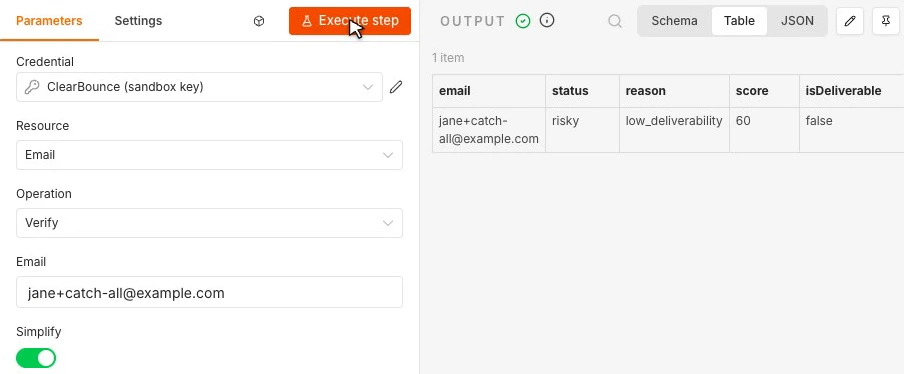
- Add a ClearBounce action and create a ClearBounce API credential with your key.
- Set Email to the field from the previous step, for example
{{ $json.email }}, and run the step.
To try it for free first, add a Test (Sandbox) key under Dashboard › API. Addresses like
undeliverable@example.com and risky@example.com then return mock results; the
sandbox reference has the full list.
Route each result
Add a Switch node after ClearBounce and branch on {{ $json.status }}:
- Deliverable: continue to your CRM, list or sequence.
- Risky: decide per workflow.
isDisposableandisCatchAlltell you why. Block disposable inboxes on trials and giveaways; allow catch-all addresses on B2B forms, where company domains often accept everything. - Undeliverable: stop. If
didYouMeanhas a value, offer the corrected address. - Unknown: wait and retry, or treat it as risky.
What it costs
One credit per address verified, and one per unique address in a bulk job. Find, job status and credit checks are free. Credits are $4 per 1,000 with our founders pricing through the end of 2026, never expire, and every new account starts with 100 free. See pricing.
The n8n integration page has an interactive demo, every operation and three example workflows you can import. Building in another tool? ClearBounce also works with Zapier and Make.
Check every address before your workflow uses it.
Create an account, install the node, and test it with a sandbox key first.
100 free credits. No credit card required.
Try ClearBounce Free