ClearBounce Is Now Built Into GP Email Validator for Gravity Forms


An address can look perfectly valid and still bounce. As of October 6, 2026, GP Email Validator can ask ClearBounce whether the mailbox actually exists before your Gravity Forms entry is saved.
Gravity Wiz added ClearBounce as a validation service in GP Email Validator, their email validation perk for Gravity Forms (here’s their announcement). Pick it in the settings, paste an API key, and every Email field is checked when the visitor presses Submit.
What changes for your forms
- Dead addresses are stopped at Submit. If the mailbox can’t receive mail, the visitor is asked for a different address and no entry is created.
- Every entry keeps its result. Saved entries are marked deliverable, risky or unknown, with a score from 0 to 100, and you can filter your entries by result.
- The details are one hover away. Disposable inbox, catch-all domain, role address, free provider: it’s all in Entries, and in your notifications through merge tags.
- Your form never breaks. If ClearBounce can’t answer, for example because you’re out of credits, the entry simply goes through.
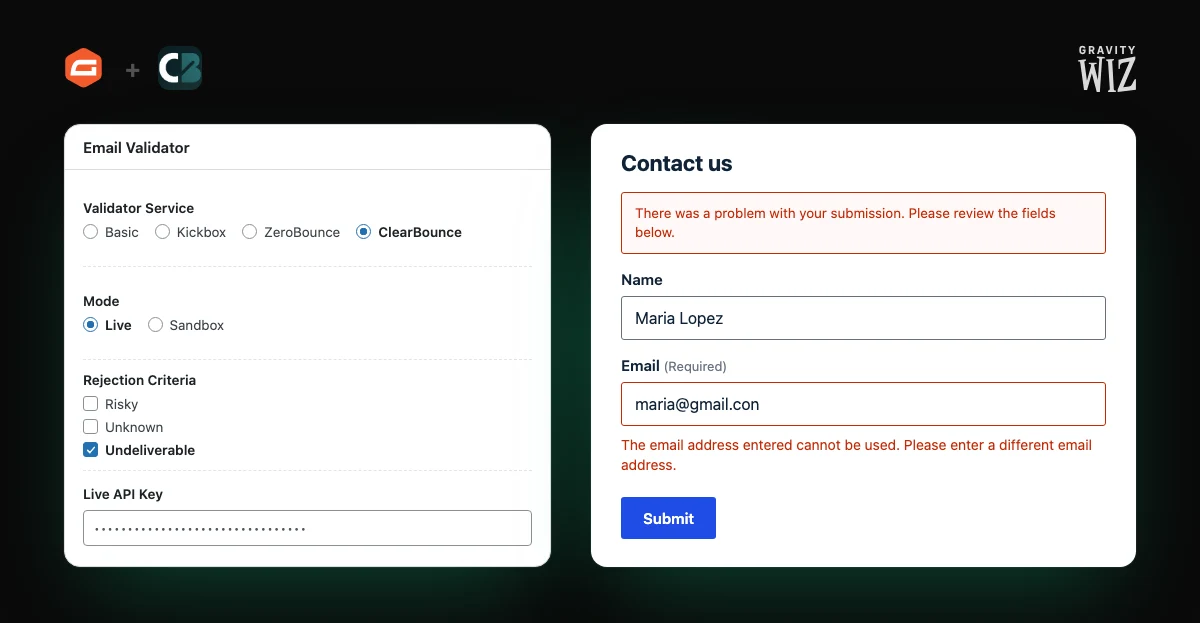
Set it up in four steps
- Install GP Email Validator. It’s included in every Gravity Perks plan.
- Create a ClearBounce account and add a Test (Sandbox) key under Dashboard › API. Your live key is already there.
- In Forms › Settings › Email Validator, choose ClearBounce, select Sandbox
and paste the test key. Submit your form with
undeliverable@example.comorrisky@example.comto see each result. Sandbox checks are free. - Switch to Live, paste your live key and save.
The Gravity Forms integration page has an interactive demo and the full list of test addresses.
Which results to reject
- Undeliverable: always. It’s the default, and the one Gravity Wiz recommends starting with.
- Risky: on giveaways, free trials and coupon forms. Allow it on B2B forms, where company domains are often catch-all.
- Unknown: usually allow. The recipient’s mail server just didn’t answer in time.
What it costs
One credit per address checked in Live mode. Credits are $4 per 1,000 with our founders pricing through the end of 2026, never expire, and every new account starts with 100 free. See pricing.
Not using Gravity Perks? Our free WordPress plugin also verifies Gravity Forms submissions.
Check every Gravity Forms address before it’s saved.
Create an account, add your key to GP Email Validator, and test it in Sandbox mode first.
100 free credits. No credit card required.
Try ClearBounce Free