E-posta Teslim Edilebilirliği Nasıl İyileştirilir: Eksiksiz Rehber (2026)
50.000 e-posta gönderiyorsunuz. ESP'niz %98 teslim oranı raporluyor. Başarı, değil mi? Tam olarak değil. Açılma oranınızı kontrol ettiğinizde %11. Tıklamalar neredeyse yok. Kampanyadan elde edilen gelir eskisinin çok küçük bir kısmı. E-postalar teknik olarak "teslim edildi" -- ancak çoğu gelen kutusuna hiç ulaşmadı.
Bu, teslim edilebilirlik açığıdır -- e-posta servis sağlayıcınızın olanı söylediği ile gerçekte olan arasındaki fark. Ve bugün e-posta pazarlamasındaki en büyük gizli problemdir.
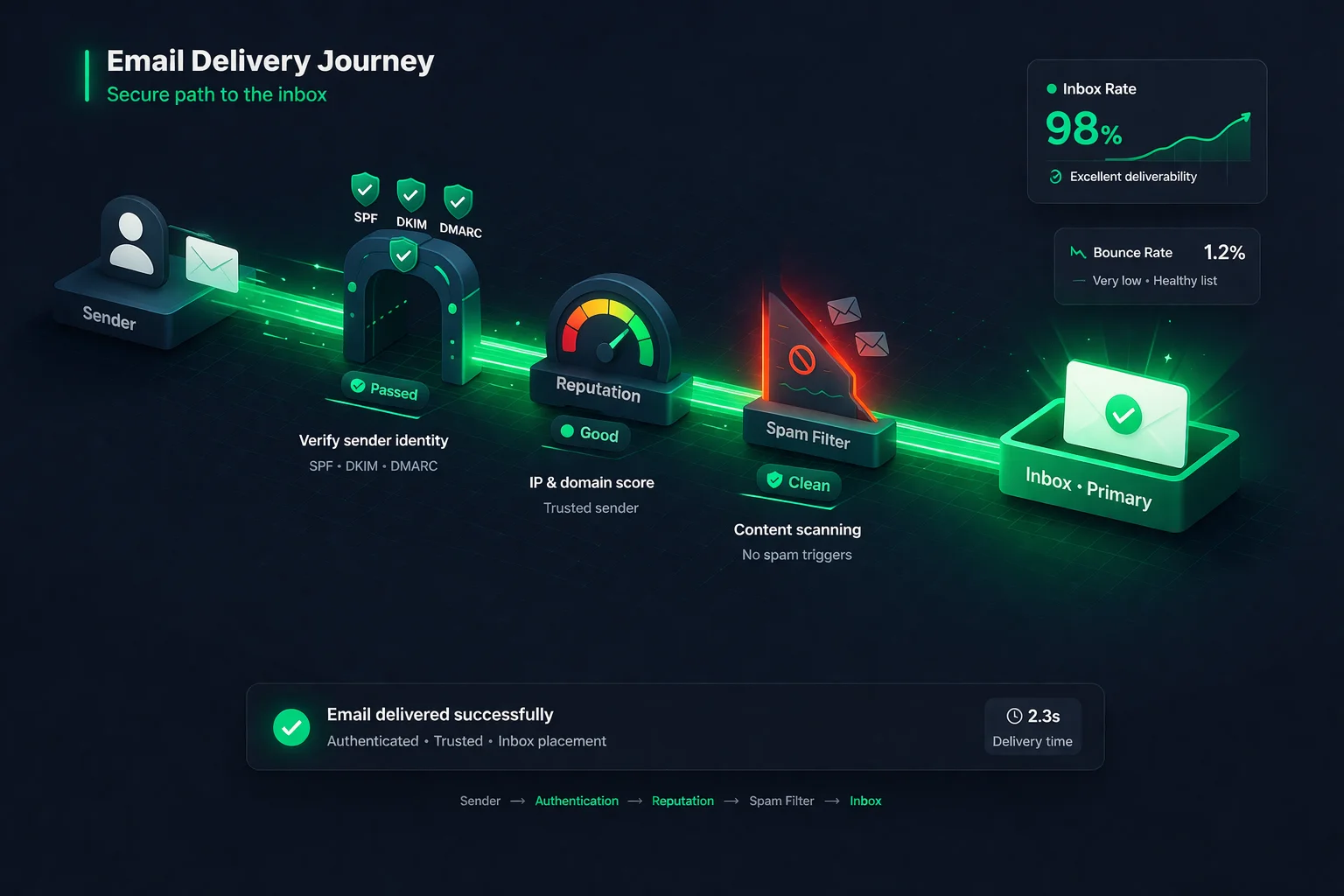
Bu rehber, 2026'da e-postalarınızın gelen kutusuna ulaşıp ulaşmayacağını belirleyen her şeyi kapsar. Kimlik doğrulama. İtibar. Liste hijyeni. Geri dönüş yönetimi. İçerik optimizasyonu. Altyapı. İzleme. Her faktörü ayrıntılı olarak ele alacak, ne yapmanız gerektiğini tam olarak gösterecek ve hemen takip edebileceğiniz bir kontrol listesi vereceğiz.
İster ani bir performans düşüşünü gidermeye çalışıyor olun, ister sıfırdan bir teslim edilebilirlik programı oluşturuyor olun, bu yer işareti koymanız gereken rehberdir.
Bu Rehberde Neler Var
- E-posta Teslim Edilebilirliği Nedir?
- E-posta Teslim Edilebilirliği Denklemi
- Kimlik Doğrulama: SPF, DKIM ve DMARC
- Gönderici İtibarı
- Liste Hijyeni ve Doğrulama
- Geri Dönüş Yönetimi
- Spam Tuzakları ve Kara Listeler
- İçerik ve Etkileşim Optimizasyonu
- Altyapı: Özel IP vs Paylaşımlı IP
- İzleme ve Araçlar
- Eksiksiz Teslim Edilebilirlik Kontrol Listesi
- Sonuç
1. E-posta Teslim Edilebilirliği Nedir?
E-posta teslim edilebilirliği, e-postalarınızı alıcının gelen kutusuna ulaştırma yeteneğinizdir -- spam klasörüne, promosyonlar sekmesine veya kapıda reddedilmeye değil. Takip ettiğiniz diğer tüm e-posta metriklerinin arkasında duran metriktir. Açılma oranları, tıklama oranları, dönüşümler -- e-posta hiç gelen kutusuna ulaşmazsa bunların hiçbiri önemli değildir.
Çoğu pazarlamacının kaçırdığı kritik bir ayrım vardır: teslim oranı, gelen kutusu yerleşim oranıyla aynı şey değildir.
Teslim Oranı
Alıcı sunucu tarafından kabul edilen e-postaların yüzdesi. %98 teslim oranı, %98'inin geri dönmediği anlamına gelir. Ancak "kabul edildi", "gelen kutusuna ulaştı" demek değildir. Bu e-postaların çoğu doğrudan spam'e yönlendirilmiş olabilir.
Gelen Kutusu Yerleşim Oranı
Gerçekten birincil gelen kutusuna düşen e-postaların yüzdesi. Gerçekten önemli olan sayı budur. Sektör karşılaştırmaları, ortalama gelen kutusu yerleşim oranını yaklaşık %83-85 olarak gösterir, yani kabaca her 6 e-postadan 1'i gelen kutusuna hiç ulaşmaz.
ESP'niz teslim oranınızı söyleyebilir, ancak gerçek gelen kutusu yerleşim oranınızı yalnızca özel araçlar söyleyebilir. Bu nedenle teslim edilebilirliği izlemek, gönderim platformunuzun gösterdiğinin ötesine bakmayı gerektirir.
2. E-posta Teslim Edilebilirliği Denklemi
Teslim edilebilirlik tek bir şey değildir -- birlikte çalışan birçok faktörün toplamıdır. Bunu, bütünün başarılı olması için her bileşenin sağlıklı olması gereken bir denklem olarak düşünün. Herhangi bir faktör başarısız olursa, tüm sistem çöker.
Gelen Kutusu Yerleşimi = Tüm Faktörlerin Toplamı
Kimlik Doğrulama
SPF + DKIM + DMARC
Gönderici İtibarı
IP + Alan adı puanları
Liste Hijyeni
Temiz, doğrulanmış listeler
Geri Dönüş Yönetimi
Hard + soft yönetimi
Tuzak ve Engel Listesi Korunması
Sıfır tolerans
İçerik ve Etkileşim
Açılmalar, tıklamalar, yanıtlar
Kimlik doğrulamanız mükemmel ancak listeniz kirliyse, teslim edilebilirlik zarar görür. Listeniz temiz ancak kara listedeyseniz, teslim edilebilirlik zarar görür. Her faktör ele alınmalıdır -- kısa yol yoktur. Her birini ayrıntılı olarak inceleyelim.
3. Kimlik Doğrulama: SPF, DKIM ve DMARC
E-posta kimlik doğrulaması, teslim edilebilirliğin temelidir. Onsuz, posta kutusu sağlayıcılarından hiçbir şeye dayanmadan size güvenmelerini istiyorsunuz. 2026'da Gmail ve Yahoo, günde 5.000'den fazla mesaj teslim eden herhangi bir gönderici için SPF, DKIM ve DMARC gerektiriyor. Birini bile kaçırırsanız, e-postalarınızın reddedilmesi veya işaretlenmesi muhtemeldir.
SPF (Sender Policy Framework)
SPF, alan adınız adına hangi posta sunucularının e-posta göndermeye yetkili olduğunu belirten bir DNS kaydıdır. Alıcı sunucu "yourdomain.com"dan bir e-posta aldığında, gönderen IP'nin onaylı listede olup olmadığını kontrol etmek için SPF kaydını kontrol eder. Listede yoksa, e-posta kimlik doğrulamasını geçemez.
DKIM (DomainKeys Identified Mail)
DKIM, gönderdiğiniz her e-postaya kriptografik bir imza ekler. Alıcı sunucu, e-postanın aktarım sırasında değiştirilmediğini ve gerçekten alan adınızdan geldiğini doğrulamak için bir açık anahtar (DNS'inizde yayınlanan) kullanır. Bunu her mesajdaki kurcalamaya dayanıklı bir mühür olarak düşünün.
DMARC (Domain-based Message Authentication, Reporting and Conformance)
DMARC, SPF ve DKIM'i birbirine bağlar ve kimlik doğrulama başarısız olduğunda alıcılara ne yapacaklarını söyler. Bir politika belirlersiniz: none (yalnızca izleme), quarantine (spam'e gönder) veya reject (tamamen engelle). DMARC ayrıca alan adınızı kullanarak kimin e-posta gönderdiğini gösteren raporlar gönderir -- meşru olsun ya da olmasın.
SPF
Alan adınız için yetkili gönderim sunucularını bildirir
DKIM
Özgünlüğü kanıtlamak için her e-postayı kriptografik olarak imzalar
DMARC
Kontroller başarısız olduğunda alıcılara ne yapacaklarını söyler
Kimlik doğrulamasını doğru yapmak tartışılmaz bir gerekliliktir. Mevcut kurulumunuzdan emin değilseniz, derinlemesine rehberimiz ihtiyacınız olan tam DNS kayıtlarını ve bunları nasıl test edeceğinizi kapsar: SPF, DKIM ve DMARC Açıklaması: Eksiksiz Kurulum Rehberi.
4. Gönderici İtibarı
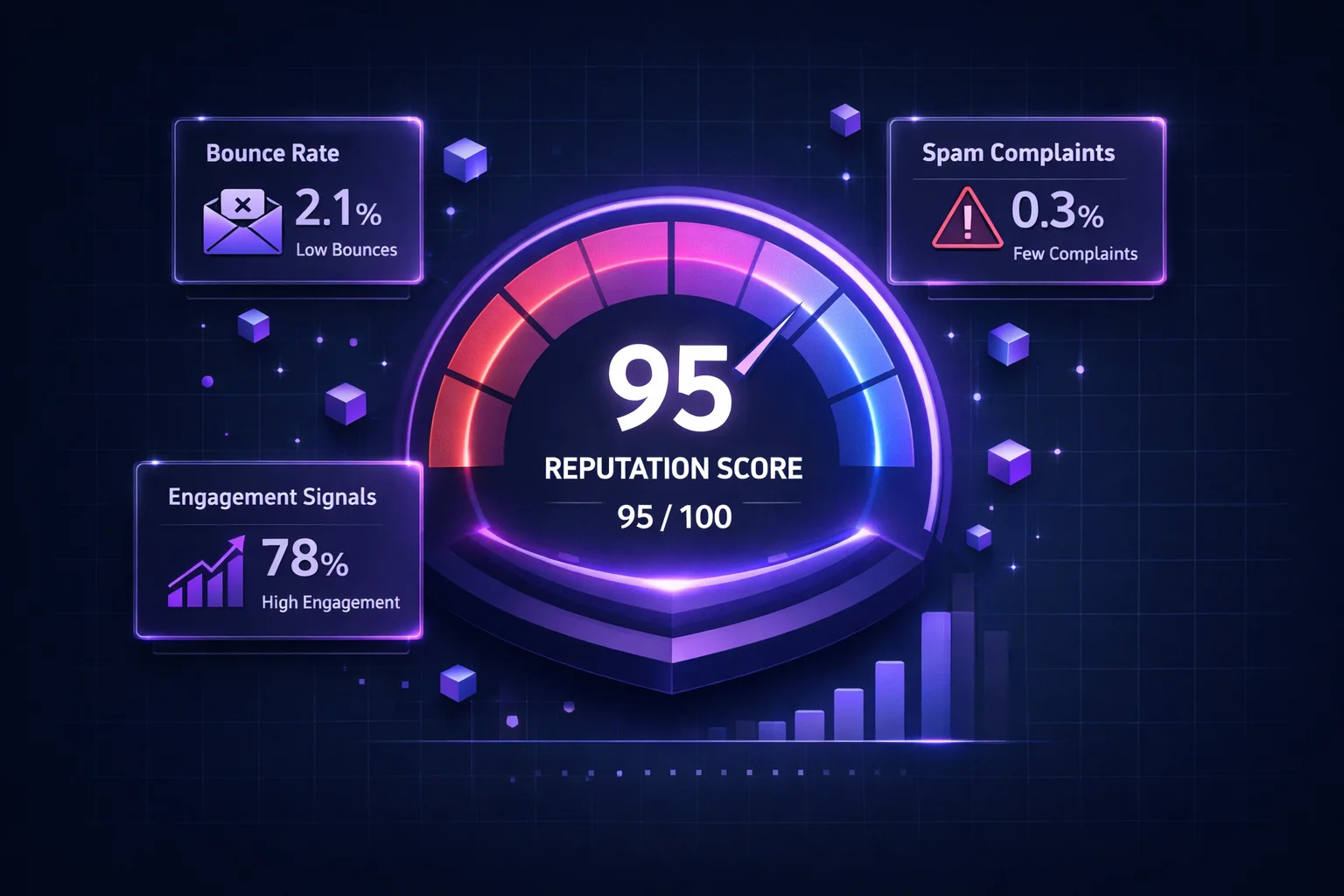
Kimlik doğrulama kim olduğunuzu kanıtlıyorsa, gönderici itibarı güvenilir olup olmadığınızı belirler. Her posta kutusu sağlayıcısı, gönderim IP adresiniz ve alan adınız için bir puan tutar. Bu puan -- zaman içinde gönderim davranışınızla oluşturulan -- gelen kutusu veya spam kararını veren birincil filtredir.
Gönderici itibarı altı temel faktör tarafından şekillendirilir:
Geçersiz adreslere gönderim yapmak itibarı yok etmenin en hızlı yoludur. Hard bounce'ları kampanya başına %2'nin altında tutun.
Alıcıların "Spam Bildir" tıklaması doğrudan ISS'ye sinyal gönderir. %0,1'in altında kalın. Gmail'in kesin sınırı %0,3'tür.
Tek bir spam tuzağı isabeti bile kara listeye alınmayı tetikleyebilir. Düzenli liste temizliği birincil savunmadır.
Ani hacim artışları ISS incelemesini tetikler. Öngörülebilir gönderim kalıplarını koruyun ve kademeli olarak ölçeklendirin.
Açılmalar, tıklamalar, yanıtlar ve yönlendirmeler itibarı artırır. Düşük etkileşim, ISS'lere e-postanızın istenmediğini söyler.
SPF, DKIM veya DMARC kontrollerini geçememek sizi güvenilmez gösterir. Üçünü de geçmek temel gerekliliktir.
İtibar hasarı oluşturmak, onarmaktan çok daha kolaydır. Doğrulanmamış bir listeye tek bir kampanya, haftalarca süren iyi gönderim davranışını yok edebilir. İtibarın nasıl çalıştığının, sizinkini nasıl kontrol edeceğinizin ve hasardan nasıl kurtulacağınızın eksiksiz bir dökümü için tam rehberimizi okuyun: E-posta Gönderici İtibarı: Nasıl Kontrol Edilir, Korunur ve Düzeltilir.
5. Liste Hijyeni: Temizlik, Doğrulama ve Pasifleri Kaldırma
E-posta listeniz ya en büyük varlığınız ya da en büyük yükümlülüğünüzdür. Temiz bir liste -- her adresin geçerli, etkileşimli ve onay vermiş olduğu -- iyi teslim edilebilirliğin temelidir. Kirli bir liste -- geçersiz adresler, spam tuzakları ve aylardır açmamış kişilerle dolu -- itibarınızı kampanya kampanya yok edecektir.
Bir listeyi "kirli" yapan nedir?
- Geçersiz adresler -- yazım hataları, terk edilmiş posta kutuları, artık var olmayan alan adları. Bunlar itibarı anında zedeleyen hard bounce'lara neden olur.
- Spam tuzakları -- gerçek görünen ancak yalnızca kötü liste uygulamalarına sahip göndericileri yakalamak için var olan adresler. Birine isabet etmek sizi anında kara listeye alabilir.
- Rol tabanlı adresler -- info@, sales@, support@. Bunlar kişisel gelen kutuları değildir ve genellikle şikayetlere yol açar.
- Tek kullanımlık/geçici adresler -- tek seferlik kullanım için oluşturulmuş ve hızla terk edilmiş. Yüksek yoğunluklar düşük kaliteli edinimi gösterir.
- Pasif aboneler -- 6+ aydır açmamış veya tıklamamış kişiler. Adresleri sonunda spam tuzaklarına dönüştürülebilir.
- Catch-all alan adları -- posta kutusunun var olup olmadığına bakılmaksızın herhangi bir e-postayı kabul eden, geçersiz adresleri maskeleyen alan adları.
Kirli bir listenin finansal ve teslim edilebilirlik etkisi şaşırtıcıdır. Rakamları Kirli E-posta Listesinin Gerçek Maliyeti yazımızda ayrıntılı olarak ele alıyoruz -- kısa versiyonu, kötü adreslerin sadece gönderimlerde para israf etmekle kalmayıp, iyi adreslere ulaşma yeteneğinize aktif olarak zarar vermesidir.
Liste hijyeni stratejisi
- Tüm listenizi doğrulayın kampanyalardan önce bir e-posta doğrulama hizmeti kullanarak. Bu, geçersiz adresleri, tek kullanımlık e-postaları ve riskli alan adlarını hasar vermeden önce yakalar.
- Toplama noktasında doğrulayın. Kötü adreslerin listenize girmesini en başından önlemek için kayıt formlarında gerçek zamanlı API doğrulaması kullanın.
- Pasifleri düzenli olarak kaldırın. 90 gündür etkileşimde bulunmayan aboneler için yeniden etkileşim kampanyası çalıştırın. 30 gün daha yanıt vermeyen herkesi kaldırın.
- Catch-all alan adlarını dikkatli ele alın. Bu alan adları tüm postaları kabul eder, standart kontrollerle bireysel adresleri doğrulamayı imkansız kılar. Rehberimizde stratejiyi öğrenin: Catch-All E-postalar: Ne Anlama Gelir ve Ne Yapmalısınız.
- Asla e-posta listesi satın almayın veya kazımayın. Satın alınan listeler spam tuzakları, kara listeler ve yok olmuş itibara giden en hızlı yoldur. İstisna yoktur.
Eksiksiz temizlik sürecinin adım adım anlatımı için E-posta Listenizi Nasıl Temizlersiniz: Adım Adım Rehber yazımıza bakın.
6. Geri Dönüş Yönetimi: Hard vs. Soft ve Ne Yapılmalı
Geri dönüşler, liste sorunlarının en görünür sinyalidir ve ISS'ler geri dönüş oranınızı yakından izler. Hard bounce ve soft bounce arasındaki farkı anlamak -- ve her birini doğru şekilde yönetmek -- teslim edilebilirliği korumak için kritiktir.
Hard Bounce
Kalıcı hatalar. Adres mevcut değil, alan adı ölü veya sunucu e-postanızı kalıcı olarak reddetti.
Eylem: Hemen kaldırın. Asla tekrar denemeyin. Her hard bounce itibarınıza zarar verir.
Soft Bounce
Geçici hatalar. Posta kutusu dolu, sunucu geçici olarak kullanılamaz, mesaj çok büyük veya alıcı sizi hız sınırlamasına alıyor.
Eylem: 72 saat içinde 2-3 kez tekrar deneyin. 3 denemeden sonra hâlâ geri dönüyorsa, hard bounce olarak değerlendirin ve kaldırın.
Önemli eşik: genel geri dönüş oranınızı kampanya başına %2'nin altında tutun. %5'in üzeri acil durumdur -- ISS'ler sizi kısmaya veya engellemeye başlayacaktır. %10'un üzeri ise muhtemelen kara listeye alınma demektir.
Geri dönüşleri önlemenin en etkili yolu göndermeden önce listenizi doğrulamaktır. Doğrulama, geri dönecek adresleri yakalar ve hasar vermeden önce kaldırır. Geri dönüş türlerinin, SMTP hata kodlarının ve kurtarma stratejilerinin ayrıntılı bir dökümü için E-postalar Neden Geri Döner ve Nasıl Düzeltilir yazımıza bakın.
7. Spam Tuzakları ve Kara Listeler
Spam tuzakları ve kara listeler, e-posta teslim edilebilirliğinin uygulama mekanizmalarıdır. Tuzaklar tespit sistemidir; kara listeler cezadır. Bir tuzağa isabet edin ve kara listeye düşebilirsiniz. Kara listeye düşün ve e-postalarınız gelen kutularına ulaşmayı durdurur -- bazen tüm internet genelinde.
Spam tuzakları: sessiz liste katilleri
Spam tuzakları, tamamen normal görünen ancak yalnızca kötü liste uygulamalarına sahip göndericileri tespit etmek için var olan e-posta adresleridir. Üç ana türü vardır:
- Saf tuzaklar -- ISS'ler ve anti-spam kuruluşları tarafından oluşturulan yepyeni adresler. Hiçbir zaman gerçek bir kişi tarafından kullanılmamışlardır, bu da birine gönderim yapmanın tek yolunun liste satın alma veya kazıma olduğu anlamına gelir. Saf bir tuzağa isabet etmek neredeyse her zaman anında kara listeye alınmayla sonuçlanır.
- Geri dönüştürülmüş tuzaklar -- bir zamanlar gerçek olan ancak terk edilen ve daha sonra tuzak olarak yeniden amaçlandırılan eski e-posta adresleri. Bir yıldan fazladır etkileşimde bulunmayan bir adrese hâlâ gönderim yapıyorsanız, geri dönüştürülmüş bir tuzak olabilir.
- Yazım hatası tuzakları -- yanlış yazılmış alan adlarındaki adresler (gmial.com veya yhaoo.com gibi) girişleri doğrulamayan göndericileri yakalar. Bunlar en yaygın türdür ve gerçek zamanlı doğrulama ile önlenmesi en kolay olandır.
Her tuzak türünün derinlemesine incelemesi ve kendinizi nasıl koruyacağınız için Spam Tuzakları Açıklaması: Nedir ve Nasıl Kaçınılır yazımızı okuyun.
Kara listeler: uygulama devreye girdiğinde
Gönderim davranışınız yeterli kırmızı bayrak tetiklediğinde -- yüksek geri dönüşler, tuzak isabetleri, şikayet hacimleri -- kara listeye düşersiniz. Spamhaus, Barracuda ve SORBS gibi büyük kara listeler, her teslim kararı sırasında posta kutusu sağlayıcıları tarafından kontrol edilir. Listelenmek, e-postalarınızın milyonlarca gelen kutusunda engellenmesi veya spam filtrelenmesi anlamına gelir.
Listeden çıkarılmak, temel nedenin belirlenmesini, tamamen düzeltilmesini ve ardından bir kaldırma talebi gönderilmesini gerektirir. Her kara listenin kendi süreci ve kriterleri vardır. Bazıları sorunu düzelttiğinizde saatler içinde sizi kaldırır; diğerleri haftalar alır. Tam süreci E-posta Kara Listeleri: Listelenmişseniz Nasıl Kontrol Edilir ve Nasıl Çıkılır yazımızda öğrenin.
Hem spam tuzaklarına hem de kara listelere karşı en iyi savunma aynıdır: kusursuz liste hijyenini koruyun, doğrulanmamış adreslere asla gönderim yapmayın ve pasifleri düzenli olarak kaldırın.
8. İçerik ve Etkileşim Optimizasyonu
Kimlik doğrulama sizi kapıdan geçirir. İtibar kapıyı açık tutar. Ancak ISS'lerin size zaman içinde güvenmeye devam edip etmeyeceğini belirleyen, içeriğiniz ve yarattığı etkileşimdir. Posta kutusu sağlayıcıları artık etkileşim sinyallerini -- açılmalar, tıklamalar, yanıtlar, silmeler, spam raporları -- e-posta kaliteniz üzerinde gerçek zamanlı bir geri bildirim döngüsü olarak kullanıyor.
Açılmayı artıran konu satırları
- Mobil görüntüleme için konu satırlarını 50 karakterin altında tutun.
- Spesifik olun ve doğru beklentiler oluşturun. Tıklama tuzağı konu satırları açılmaları artırır ama spam şikayetlerini de artırır.
- Veriniz olduğunda kişiselleştirin. Alıcının adını veya şirketini içeren konu satırları %20-30 daha yüksek açılma oranları görür.
- Spam tetikleyici kalıplardan kaçının: TAMAMI BÜYÜK HARF, aşırı noktalama (!!!), ve "ücretsiz," "acil," veya "hemen harekete geçin" gibi kelimelerin aşırı kullanımı.
Etkileşimi artıran içerik
- Önce değer, sonra tanıtım. Sürekli değer sağlayan e-postalar, zaman içinde teslim edilebilirliği artıran etkileşim alışkanlıkları oluşturur.
- Sağlıklı bir metin-görsel oranı koruyun. %100 görsellerden oluşan e-postalar genellikle işaretlenir. En az %60 metin içeriği hedefleyin.
- Net, belirgin harekete geçirici mesajlar ekleyin. Tıklamalar, itibarı artıran pozitif etkileşim sinyalleridir.
- Yanıtları teşvik edin. Yanıtlar, üretebileceğiniz en güçlü pozitif sinyaldir. Sorular sorun. Geri bildirim isteyin. E-postalarınızı sohbet tarzında yapın.
- Abonelikten çıkmayı kolaylaştırın. Görünür, tek tıklamalı bir abonelik iptal bağlantısı çok daha kötü alternatifi önler: spam şikayeti. Gmail ve Yahoo artık list-unsubscribe başlıkları gerektirmektedir.
Gönderim sıklığı ve zamanlaması
Aşırı gönderim yorgunluğa, yorgunluk etkileşimsizliğe, etkileşimsizlik spam şikayetlerine yol açar. Yetersiz gönderim ise unutulan aboneliklere yol açar, bu da gönderim yaptığınızda spam şikayetlerine neden olur. Kitlenizin yanıt verdiği ritmi bulun ve ona bağlı kalın. Çoğu B2B gönderici haftada 1-2 e-posta ile en iyi performansı gösterir. B2C sektöre göre büyük farklılıklar gösterir.
9. Altyapı: Özel IP vs. Paylaşımlı IP ve Isınma
Gönderim altyapınız -- özellikle IP adresleri ve gönderim alan adı yapılandırması -- teslim edilebilirlikte doğrudan bir rol oynar. Buradaki en büyük karar, paylaşımlı IP mi yoksa özel IP mi kullanacağınızdır.
| Paylaşımlı IP | Özel IP | |
|---|---|---|
| İtibar | Aynı IP'deki diğer göndericilerle paylaşılır | Tamamen sizin -- yalnızca davranışınız şekillendirir |
| En uygun | Ayda 100K'nın altında e-posta gönderenler | Yüksek hacimli göndericiler (ayda 100K+) |
| Risk | Kötü bir komşu teslim edilebilirliğinize zarar verebilir | Hatalarınızın tamponu yoktur |
| Isınma gerekli mi? | Hayır -- IP'nin zaten gönderim geçmişi var | Evet -- zorunlu 2-4 haftalık ısınma dönemi |
| Maliyet | Standart ESP planlarına dahil | Genellikle ücretli eklenti (ayda 20-50$) |
| Kontrol | Sınırlı -- ESP'nin uygulamasına bağlı | Gönderim kalıpları ve hacim üzerinde tam kontrol |
IP ısınması: tartışılmaz ilk adım
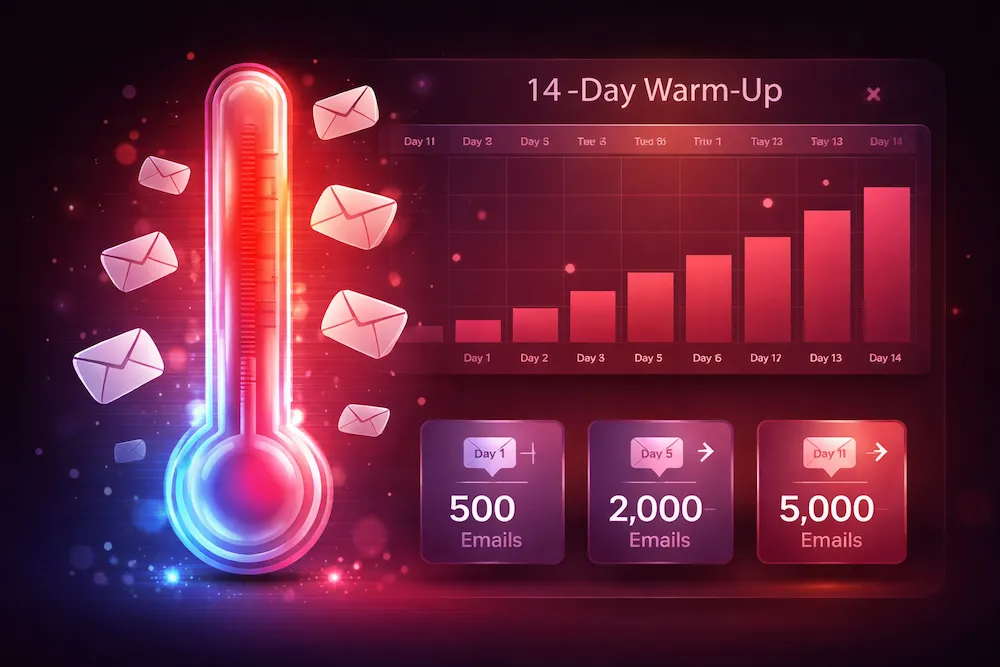
Özel bir IP'ye veya yeni bir gönderim alan adına geçerseniz, onu kademeli olarak ısıtmanız zorunludur. Yepyeni bir IP'nin sıfır itibarı vardır -- ve ISS'ler "itibar yok"u neredeyse "kötü itibar" kadar olumsuz değerlendirir. Isınma süreci şöyle görünür:
- 1. Hafta: En etkileşimli abonelerinize (son 30 gün içinde açmış veya tıklamış) günde 200-500 e-posta gönderin.
- 2. Hafta: Günde 500-1.000'e iki katına çıkarın. Geri dönüşleri ve şikayetleri izleyin. Herhangi biri artarsa yavaşlayın.
- 3. Hafta: Günde 2.000-5.000'e artırın. Son 60 gün içinde etkileşimde bulunan abonelere genişletin.
- 4. Hafta+: Hedef hacminize ulaşana kadar ikiye katlamaya devam edin, her zaman geri dönüş oranlarını, şikayet oranlarını ve gelen kutusu yerleşimini izleyin.
Isınmayı aceleye getirmek en yaygın teslim edilebilirlik hatalarından biridir. İlk gün yepyeni bir IP'den 50.000 e-posta göndermek neredeyse kesinlikle kısılmanıza veya engellemenize neden olacaktır -- ve ortaya çıkan geri dönüş ve şikayet artışı, itibarınızı daha başlamadan geri çekecektir.
Alt alan adı stratejisi
Farklı e-posta türleri için ayrı alt alan adları kullanmayı düşünün: promosyon e-postaları için marketing.yourdomain.com, makbuzlar ve şifre sıfırlamaları için transactional.yourdomain.com. Bu, itibarı izole eder, böylece ters giden bir pazarlama kampanyası işlemsel e-postalarınızı -- müşterilerinizin ürününüzü kullanmak için bağımlı olduğu -- etkilemez.
10. İzleme ve Araçlar
Bilmediğiniz teslim edilebilirlik sorunlarını düzeltemezsiniz. Proaktif izleme, sorunları kriz haline gelmeden yakalar ve e-posta programınız hakkında bilinçli kararlar vermeniz için gerekli verileri sağlar.
Google Postmaster Tools (Ücretsiz)
Gmail adreslerini hedefleyen herhangi bir gönderici için en önemli izleme aracı -- ki bu çoğu göndericidir. Alan adınızı doğruladıktan sonra Postmaster, alan adı itibarınızı (Yüksek, Orta, Düşük, Kötü), spam oranını, kimlik doğrulama geçiş oranlarını ve şifreleme metriklerini gösterir. En az haftalık kontrol edin. İtibarınız Yüksek'ten Orta'ya düşerse, daha fazla düşmeden önce hemen harekete geçin.
Microsoft SNDS (Ücretsiz)
Smart Network Data Services, Outlook ve Hotmail için IP düzeyinde itibar verileri sağlar. IP başına mesaj hacmini, şikayet oranını ve tuzak isabetlerini gösterir. Google Postmaster'dan daha az ayrıntılı ancak kitlenizin herhangi bir kısmı Microsoft e-posta kullanıyorsa zorunludur.
Kara liste izleme
Gönderim IP'lerinizi ve alan adlarınızı büyük kara listelerle (Spamhaus, Barracuda, SORBS, Spamcop ve diğerleri) en az günlük olarak kontrol etmek için otomatik izleme kullanın. ClearBounce'un Teslim Edilebilirlik Kiti, gerçek zamanlı uyarılarla otomatik kara liste izlemesi içerir, böylece listelendığınız anı bilirsiniz -- açılma oranlarınızın çöktüğünü fark ettiğiniz günler sonra değil.
Gelen kutusu yerleşim testi
Gerçek gelen kutusu yerleşim oranınızı bilmenin tek yolu test etmektir. Tohum listesi testi, e-postanızı Gmail, Outlook, Yahoo ve diğer sağlayıcılardaki izlenen gelen kutularına gönderir, ardından her birinin nereye düştüğünü kontrol eder. Bu, ESP'nizin teslim oranının sağlayamadığı gerçek durumu size verir. ClearBounce Teslim Edilebilirlik Kiti, tüm büyük sağlayıcılarda gelen kutusu yerleşim testi içerir.
Etkileşim analitiği
ESP'nizin yerleşik analitiği kampanya başına açılma oranlarını, tıklama oranlarını, geri dönüş oranlarını ve abonelik iptal oranlarını gösterir. Bunları zaman içinde takip edin ve eşikler belirleyin. Açılma oranları %15'in altına düşerse veya geri dönüş oranları %2'yi aşarsa, hemen araştırın. Analitiği posta kutusu sağlayıcısına göre segmentlemek (Gmail vs. Outlook vs. Yahoo) sağlayıcıya özel sorunları belirlemenize yardımcı olur.
11. Eksiksiz Teslim Edilebilirlik Kontrol Listesi
Bu kontrol listesini e-posta programınız için düzenli bir denetim olarak kullanın. Her kutuyu işaretleyebiliyorsanız, teslim edilebilirliğiniz mükemmel durumdadır.
| Kategori | Eylem Maddesi | Sıklık | Öncelik |
|---|---|---|---|
| Kimlik Doğrulama | SPF kaydı yapılandırılmış ve geçiyor | Herhangi bir DNS veya ESP değişikliğinden sonra | Kritik |
| Kimlik Doğrulama | DKIM imzaları geçerli ve hizalı | Herhangi bir DNS veya ESP değişikliğinden sonra | Kritik |
| Kimlik Doğrulama | DMARC politikası ayarlı (quarantine veya reject) | İlk kurulumdan sonra, üç ayda bir gözden geçirin | Kritik |
| Liste Hijyeni | Kampanyalardan önce e-posta listesini doğrulayın | Her büyük gönderimden önce | Kritik |
| Liste Hijyeni | Her gönderimden sonra hard bounce'ları kaldırın | Her kampanyadan sonra | Kritik |
| Liste Hijyeni | 6+ aydır pasif aboneleri kaldırın | Üç ayda bir | Yüksek |
| Liste Hijyeni | Kayıtta e-postaları gerçek zamanlı doğrulayın | Sürekli (otomatik) | Yüksek |
| İtibar | Google Postmaster Tools'u kontrol edin | Haftalık | Yüksek |
| İtibar | Kara listeleri izleyin | Günlük (otomatik) | Yüksek |
| İtibar | Spam şikayetlerini %0,1'in altında tutun | Her kampanyadan sonra | Kritik |
| İçerik | Konu satırları doğru ve spam değil | Her gönderimde | Standart |
| İçerik | Tek tıkla abonelik iptal bağlantısı + list-unsubscribe başlığı | Her gönderimde | Kritik |
| İçerik | Büyük kampanyalardan önce gelen kutusu yerleşimini test edin | Büyük gönderimlerden önce | Yüksek |
| Altyapı | Tam hacimden önce yeni IP'leri/alan adlarını ısıtın | Altyapı değişikliğinde | Kritik |
| Altyapı | Pazarlama vs. işlemsel için ayrı alt alan adları kullanın | Tek seferlik kurulum | Standart |
| Etkileşim | Etkileşim düzeyine göre segmentleyin | Her kampanyada | Yüksek |
| Etkileşim | Pasifler için yeniden etkileşim kampanyaları çalıştırın | Üç ayda bir | Standart |
12. Sonuç
E-posta teslim edilebilirliği, bir kez yapılandırıp unutacağınız tek bir ayar değildir. Birden fazla boyutta dikkat gerektiren devam eden bir uygulamadır: kimlik doğrulama, itibar, liste kalitesi, içerik, altyapı ve izleme. Bunlardan herhangi birinin gevşemesine izin verin ve gelen kutusu yerleşiminiz zarar görür.
İyi haber mi? Her faktör kontrolünüz dahilindedir. Alan adınızı doğrulayıp doğrulamayacağınızı siz seçersiniz. Listenizi doğrulayıp doğrulamayacağınızı siz seçersiniz. İtibarınızı izleyip izlemeyeceğinizi veya körü körüne uçup uçmayacağınızı siz seçersiniz. Sürekli olarak gelen kutusuna ulaşan göndericiler, teslim edilebilirliği sonradan düşünülen bir şey olarak değil, bir disiplin olarak ele alanlardır.
Bu rehberden tek bir şey çıkarıyorsanız, şu olsun: e-posta listenizin kalitesi, teslim edilebilirliğinizin kalitesini belirler. Diğer her şey -- kimlik doğrulama, içerik, altyapı -- önemlidir, ancak listenizde olmaması gereken adreslere gönderim yapıyorsanız hepsi çöker. Temiz bir listeyle başlayın ve diğer tüm teslim edilebilirlik metrikleri kolaylaşır.
Teslim edilebilirlik bir kez çözülecek bir problem değildir. Sürdürülecek bir standarttır. E-postada kazanan markalar, göndermeden önce doğrulayan, gönderdikten sonra izleyen ve sorunlar başlamadan önce listelerini temizleyenlerdir.
Daha Derine İnin: İlgili Rehberler
Bugün teslim edilebilirliğinizi iyileştirmeye başlayın.
ClearBounce, gelen kutusuna ulaşmak için ihtiyacınız olan her şeyi sunar: geri dönüşleri ve spam tuzaklarını ortadan kaldırmak için e-posta listesi doğrulaması, kötü adresleri dışarıda tutmak için gerçek zamanlı API doğrulaması ve kara listeleri izlemek ve gelen kutusu yerleşimini test etmek için eksiksiz bir teslim edilebilirlik kiti.
100 ücretsiz kredi. Kredi kartı gerekmez.
Ücretsiz Doğrulamaya Başlayın